SOUNDBOY SELECTA

Sort a record pool drop at the speed you can hear it.

A track plays the moment it lands. You listen for a few seconds, press a number, and it's filed. The next one is already playing. Three hundred downloads go from a heap in your Downloads folder to a sorted library in the time it takes to listen to them.

Download for Mac Every feature Free for a month · macOS 12+ · Windows beta

The real app, twenty seconds of a session. Enter files into the glowing key, number keys file the rest, a track you already own goes to the trash, and ⌘Z takes back a Maybe. The artists and tracks are made up for the demo.

No account, no cloud of ours Nothing is ever overwritten Undo goes fifty deep Keyboard, phone, Stream Deck, voice

Hear it. File it. Next.

The whole product is one loop, and everything in it exists to make that loop faster.

A track lands and plays itselfNot from the intro, from where the music is. It checks, and moves the start when it would have dropped you into a breakdown.
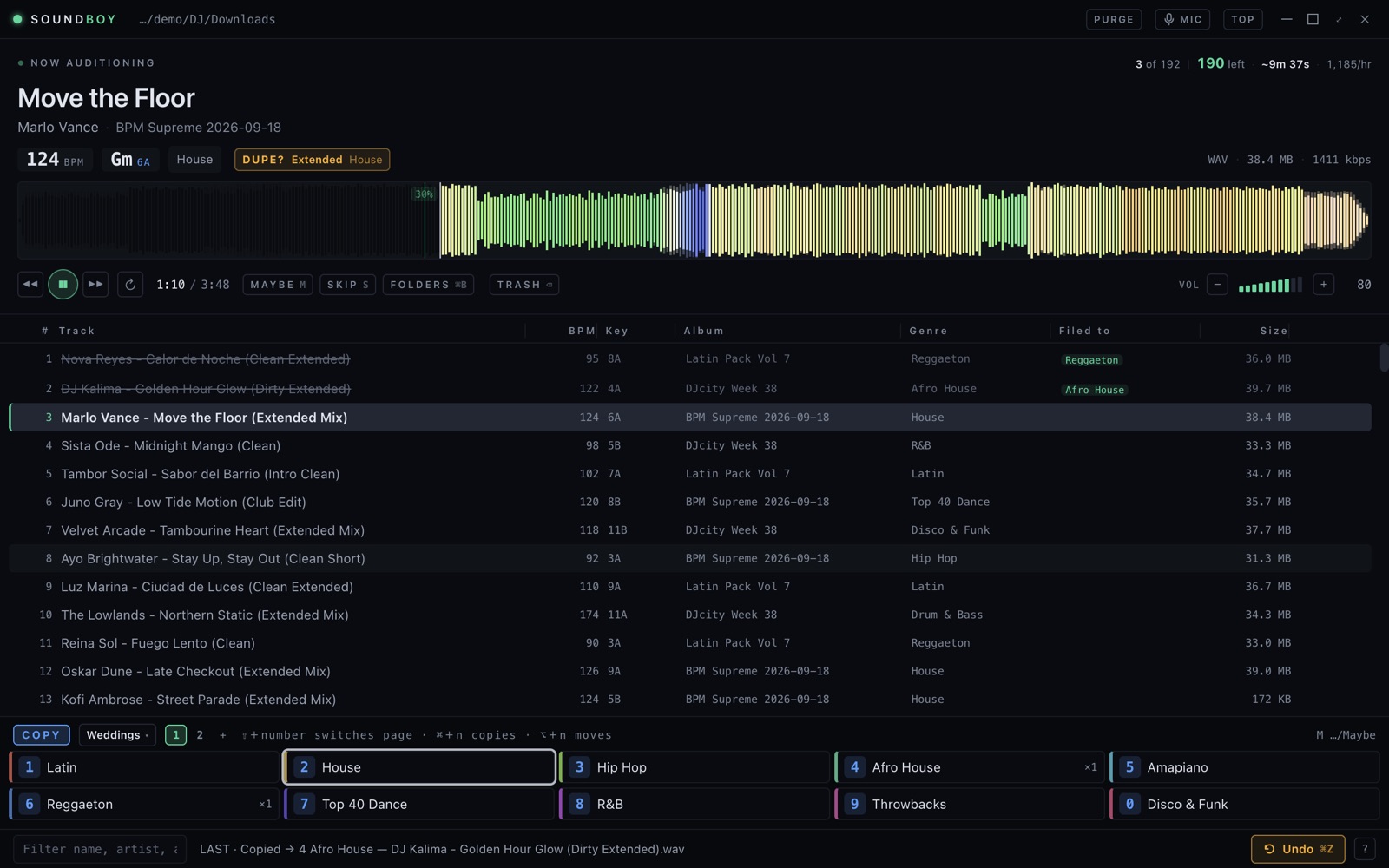
You read it at a glanceA waveform coloured by frequency, so you see the drop before you reach it. BPM, key in both notations, genre and the pack it came from.
You press a numberThe file moves into that folder and the key says so. Ten folders a page, six pages. Nothing is overwritten.
The next track is already playingIt was read and drawn while you listened to the last one. No wait, no spinner.
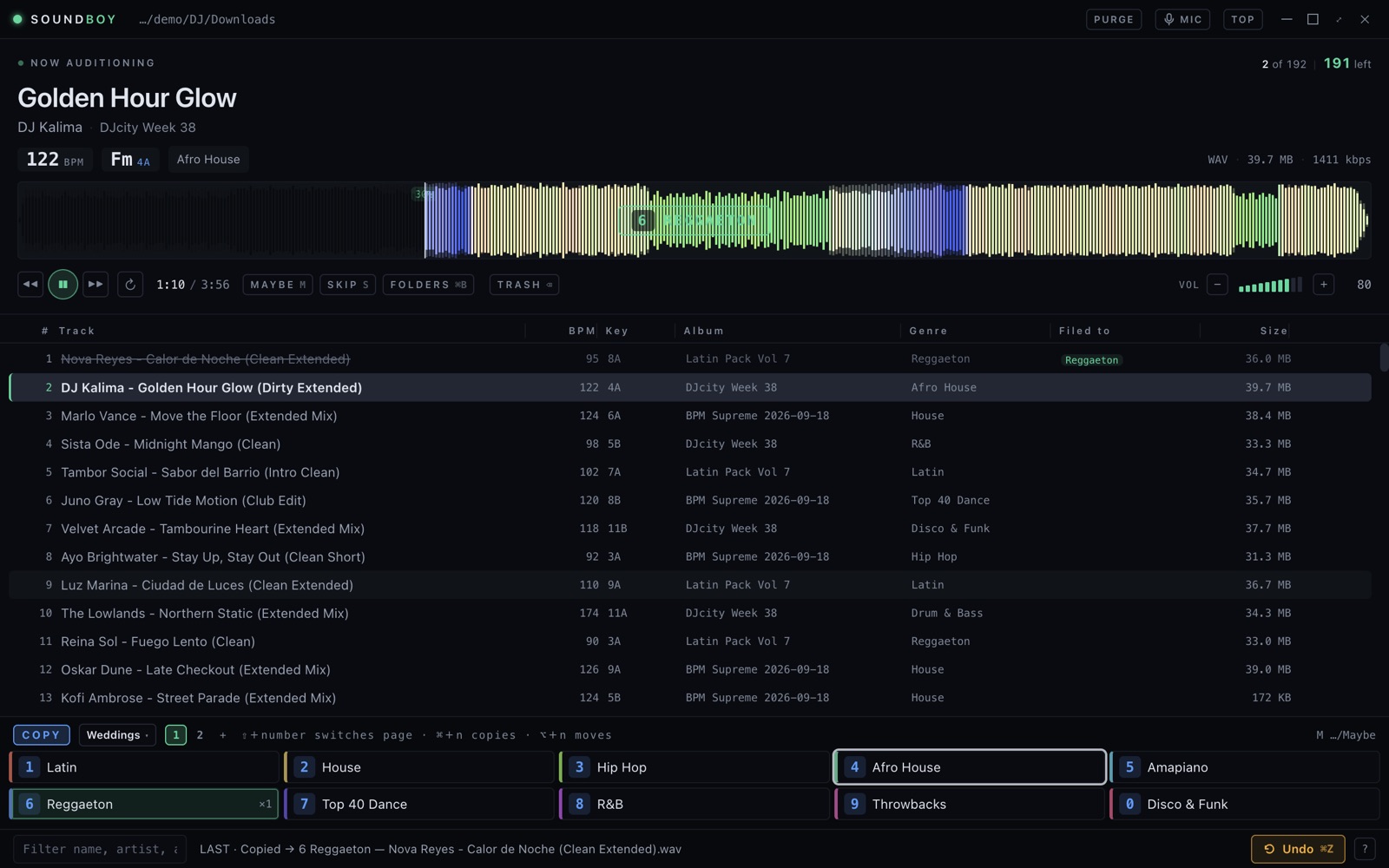
Soundboy just after filing a track: the waveform flashes 6 Reggaeton, the filed track is crossed out in the queue, and the next track is playing
Pressed 6. The key flashes, the track is crossed out with where it went, and the next one is playing.

It knows what you already own

Pools send tracks you bought last year and four cuts of the one you wanted. Both cost you an audition, unless something catches them first.

  • Checked before you start. When a crate lands it says how many you already have, which came in more than one cut, and which are byte-for-byte copies you can trash in one go.
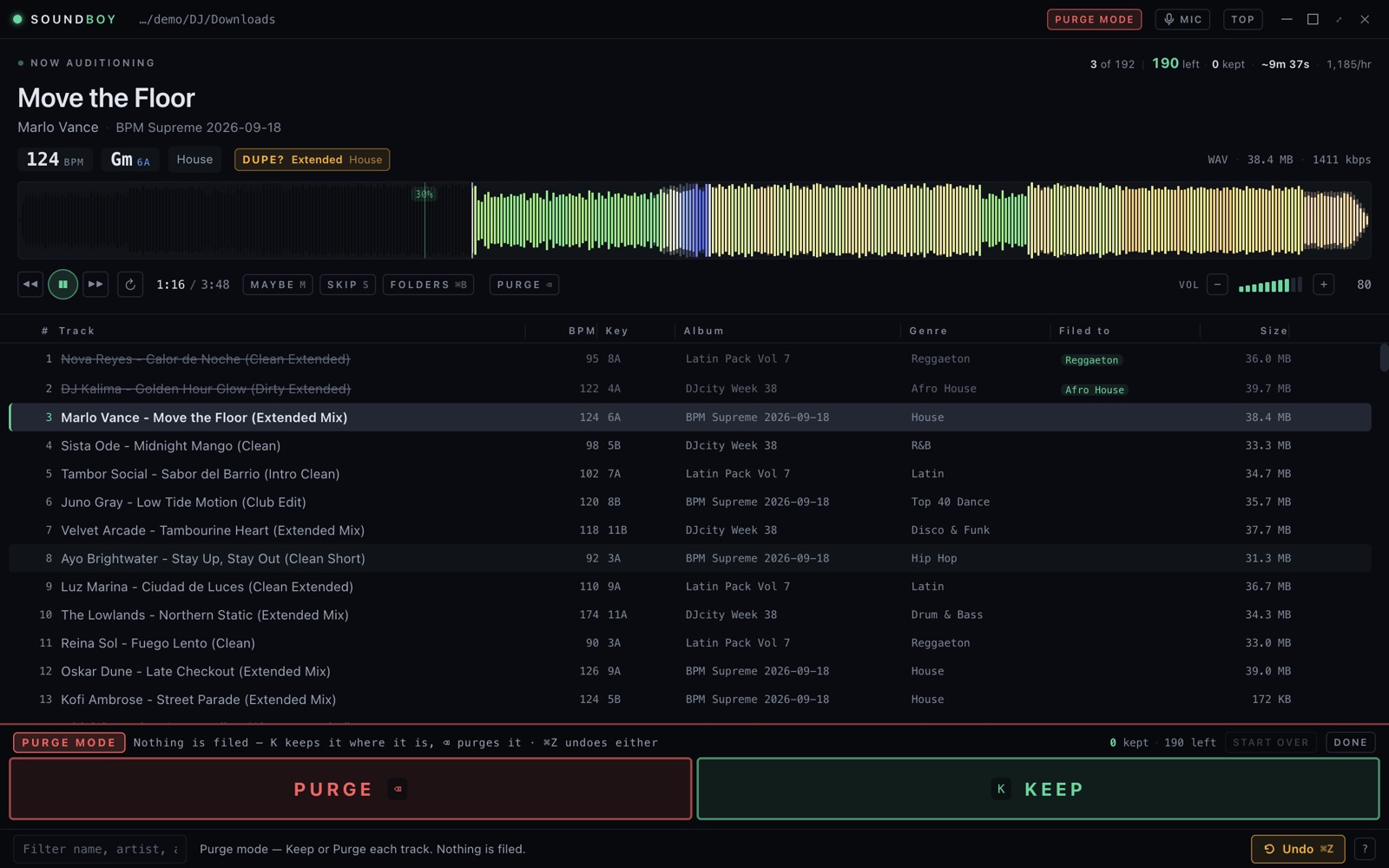
  • DUPE? names the folder. A track you already own says where your copy is, and the key for that folder glows. Enter files it; ⌫ trashes it.
  • Clean and dirty aren't duplicates. It reads the version in the name and stays quiet when the cuts really differ.
  • Your whole library, not one folder. Every folder you file into is indexed, so the track you buried last winter still gets caught.
A track marked DUPE? Extended, House, with the House key ringed as the suggestion
Already in House, the same Extended cut. The House key is ringed; the pace readout says ten minutes to go.
Private beta · iPhone & iPad

Or sort it on your phone, with the Mac asleep

Cloud mode sorts your Dropbox straight from the phone. The pads are your folders, copied from the Mac in one tap. Dropbox moves the files on its own servers, so filing a 40 MB WAV takes no longer than an MP3.

  • Six pages of ten pads, mirrored from the Mac so you never choose sixty folders twice.
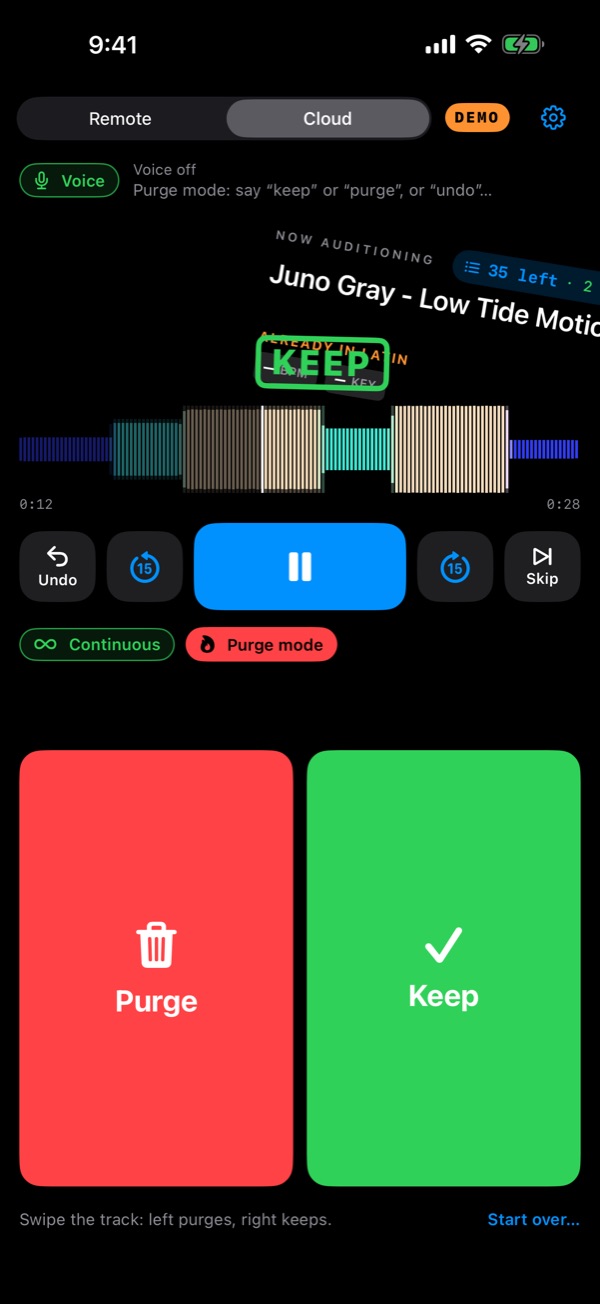
  • Purge mode with a swipe. For a folder that's grown too big: right keeps, left purges, undo takes either back.
  • Voice mode. “Three.” “Trash it.” “Back thirty.” It listens through your AirPods, and ignores the lyrics.
  • Apple Watch in the same app: play, trash, undo and every folder on your wrist.

Shown in demo mode, which has no BPM or key tags. Ask to join the beta.

Purge mode on the phone: the track card mid-swipe, stamped KEEP

Or from across the room

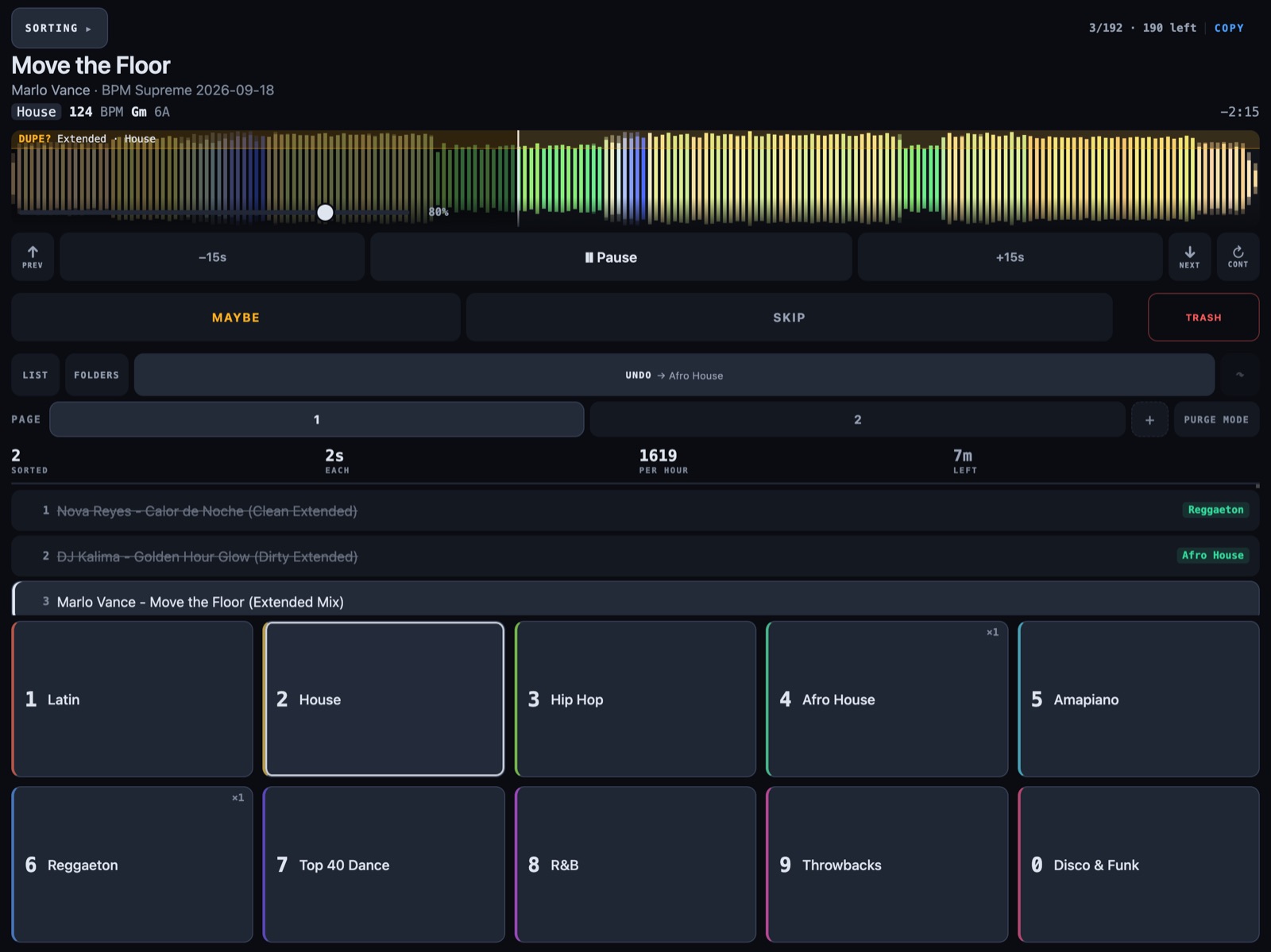
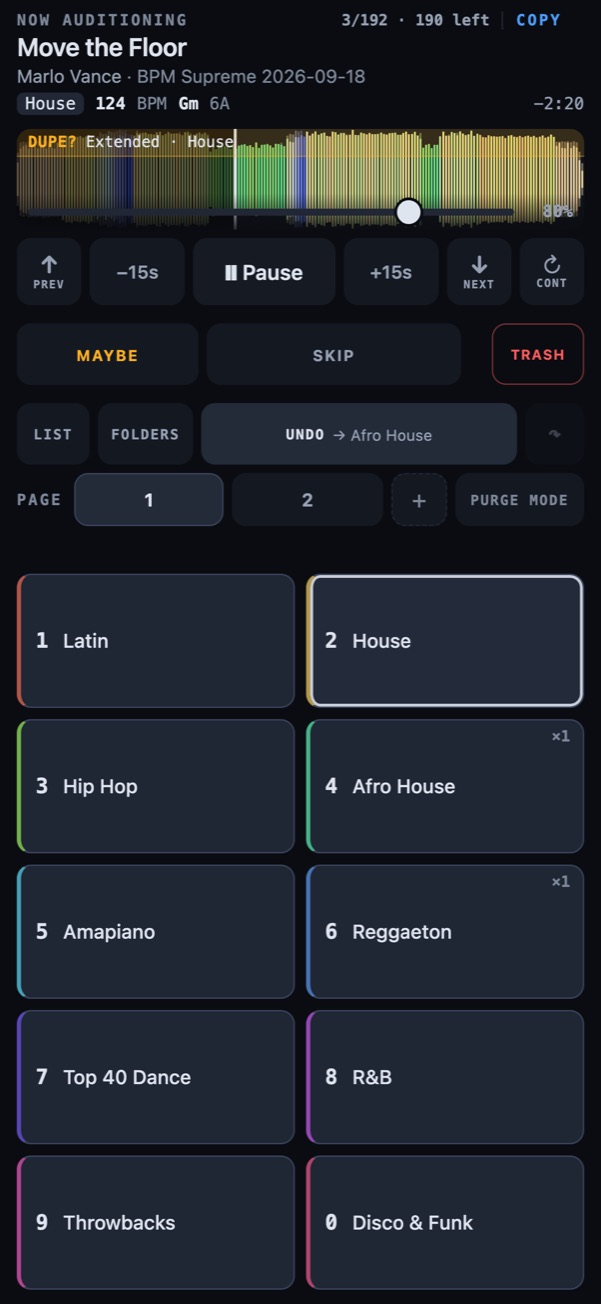
Turn on the phone remote and scan the code. Any phone or iPad becomes the whole control surface, over your own Wi-Fi and nothing else. The keys wear the same colours as on the Mac, and the one it thinks the track belongs to is ringed.

The remote on an iPad: now playing, transport, the queue, and ten keys in the shape of the Mac's number row
The remote on an iPhone: the waveform with a DUPE? banner, transport, and ten coloured keys with House ringed

Three iPad layouts

Sorting, Browsing and Monitor, one button apart. Ten keys laid out like the number row on your Mac.

Every folder, not just the keys

Search them all, file into any, and hold one to put it on a key.

How the night is going

Sorted, seconds each, per hour, time left. The pace is a median, so a coffee break doesn't ruin it.

Nothing to install

It's a web page the Mac serves. The iPhone app's Remote mode shows the same thing, with the watch on top.

Purge mode, for the folders you've let go

Nothing gets filed. Every track in the folder is heard once and either kept where it is or purged to a trash you can open.

  • K keeps, ⌫ purges, ⌘Z undoes either. On the phone, swipe.
  • It remembers what you kept, so next time you only hear the ones you haven't judged.
  • Start over plays them all again. Purged tracks stay purged.
Purge mode on the Mac: Purge and Keep in place of the number keys, with the kept count

Built for the way you actually work

Your DJ software sees it too

Every filing can also land in a Serato crate, a rekordbox playlist, a Traktor playlist or an M3U, named after the folder.

Stream Deck and MIDI

Keys that show the playing track and the folder behind each slot. MIDI learn for any pad controller. Global keys work while you're in Finder.

Profiles and pages

A wedding setup and a club setup need different folders. Switch the whole layout in one keystroke.

Nothing is ever overwritten

Same-name clashes ask. Moves are checked before the original goes. Trash is a folder you can open, and undo puts it back.

Dropbox without syncing it

Point it at your Dropbox and the files never download to file them. Only the track you're hearing comes down.

Every folder, one keystroke away

⌘B shows your whole library as a shelf. Search it, file anywhere. ⇧7 puts your ten busiest folders on the keys.

Every feature, and where it works →   Read the manual →

Price

Bought once, not rented. No account and no cloud of ours, so there is nothing to keep paying for.

$69 once — not a subscription
  • Free for a month first, everything switched on
  • Unlimited tracks and folders
  • Phone, iPad and Apple Watch remote included
  • Free updates within the current major version
  • Works offline — no account, no cloud
  • 30 days to change your mind, no argument
Start the free month

The month starts when you open it, not when you download it. Nothing to cancel — if you do nothing, filing simply stops and the app stays yours to open.

Download

Signed and notarised, so it opens on a double-click — no warnings, no workarounds. Free for a month with everything switched on, then $69 once if you keep it. It keeps itself current: new versions download quietly and install themselves when you quit.

Not sure which Mac? Apple menu ▸ About This Mac — an “Apple M” chip means Apple Silicon. Requires macOS 12 or later. New to it? The manual starts with setup.

The Windows build is a fresh beta and not yet signed, so SmartScreen will warn once — “More info”, then “Run anyway”. Windows 10 or later.

Want one email when the paid version launches?

One email, at launch. No newsletter, no sequence, and the list is not shared or sold. Privacy.