SOUNDBOY SELECTA

Everything it does, and where it does it.

One job: get a heap of new downloads heard and into the right folders as fast as you can decide. Every feature below makes that faster, safer, or possible from somewhere other than the laptop.

Mac macOS 12 or later Windows Windows 10 or later, beta Phone page any phone's browser, nothing to install iPhone app iPhone and iPad, private beta Watch Apple Watch, private beta
The loop Filing What you already own Purge mode Voice DJ software Remotes and hardware iPhone, iPad and Watch Dropbox Trust Where each one works
Soundboy auditioning a track marked DUPE? with the House key ringed as the suggestion

The loop

Hear it, file it, next. A track plays, you press a key, and the next one is already loaded.

Starts where the music is

Every track starts 30% in, because intros tell you nothing. Skip the breakdown checks that point, and moves it when it would land in a quiet section.

MacWindowsiPhone app

The next track is already loaded

It's read, and its waveform drawn, while you listen to the current one. Pressing a key moves you straight on.

MacWindowsiPhone app

A waveform you can read

Coloured by frequency, warm for bass and cool for treble, so you can see the drop coming. Click or tap it to jump there.

MacWindowsPhone pageiPhone appWatch

BPM and key up front

Read from the tags, decimals kept. The key shows in both notations, like F♯m 11A, whichever one the tag used.

MacWindowsiPhone app

Every format a pool sends

MP3, WAV, AIFF, FLAC, M4A and AAC. A file that won't preview stays in the queue and can still be filed.

MacWindowsiPhone app

Continuous play

Press C. When a track ends, the next plays from its start, and nothing is filed for you. Scrubbing to the end doesn't count as ending.

MacWindowsPhone pageiPhone app

Your pace

Tracks sorted, seconds each, tracks per hour and time left. The pace is a median, so a coffee break doesn't wreck it.

MacWindowsPhone pageiPhone app

New downloads join the queue

It watches the folder. Tracks join in the order they arrived, and a download still in progress waits until it's finished.

MacWindowsiPhone app

Filing

Ten keys, six pages, and a separate setup for each kind of gig. Nothing is overwritten, and every move can be undone.

One key, one folder

10 file into ten folders. Press a key that has no folder yet and it asks you to pick one.

MacWindows

Six pages of ten

Sixty folders in one setup. ⇧1⇧6 switch pages, and the number keys follow.

MacWindowsPhone pageiPhone app

Profiles

A wedding setup and a club setup, each with its own folders. ⌘P swaps the whole layout. Duplicate a profile to start the next one.

MacWindows

Copy or move

Pick one in Settings. Hold to copy or to move just this track.

MacWindows

Maybe and Trash

M sends a track to your Maybe folder. moves it to a Soundboy Trash folder you can open. Nothing is ever deleted.

MacWindowsPhone pageiPhone appWatch

Undo that actually undoes

⌘Z puts the file back where it was, up to fifty steps back, and redo works too. If something else has taken the name since, it stops rather than overwrite it.

MacWindowsPhone pageiPhone appWatch

Never overwrites

Same name, different file: it's saved as Track (2) and you're told. Same name and same size: it asks first. A move to another drive is checked before the original is removed.

MacWindowsiPhone app

It suggests a folder

If a copy of the song is already in a folder, or that genre usually goes there, the folder's key glows. files it there.

MacWindowsiPhone app

Auto page

⇧7 puts your ten most-used folders on the number keys, busiest first.

MacWindows

The folder shelf

⌘B shows every folder in your library, not only the ones on keys. Search it, then file into any of them.

MacWindowsPhone page

A double-press files one track

A stuttered keypress can't file the next track before you've heard it.

MacWindowsPhone pageiPhone app

A record of every move

Each filing goes into a daily log on your own disk, with where every file went.

MacWindows
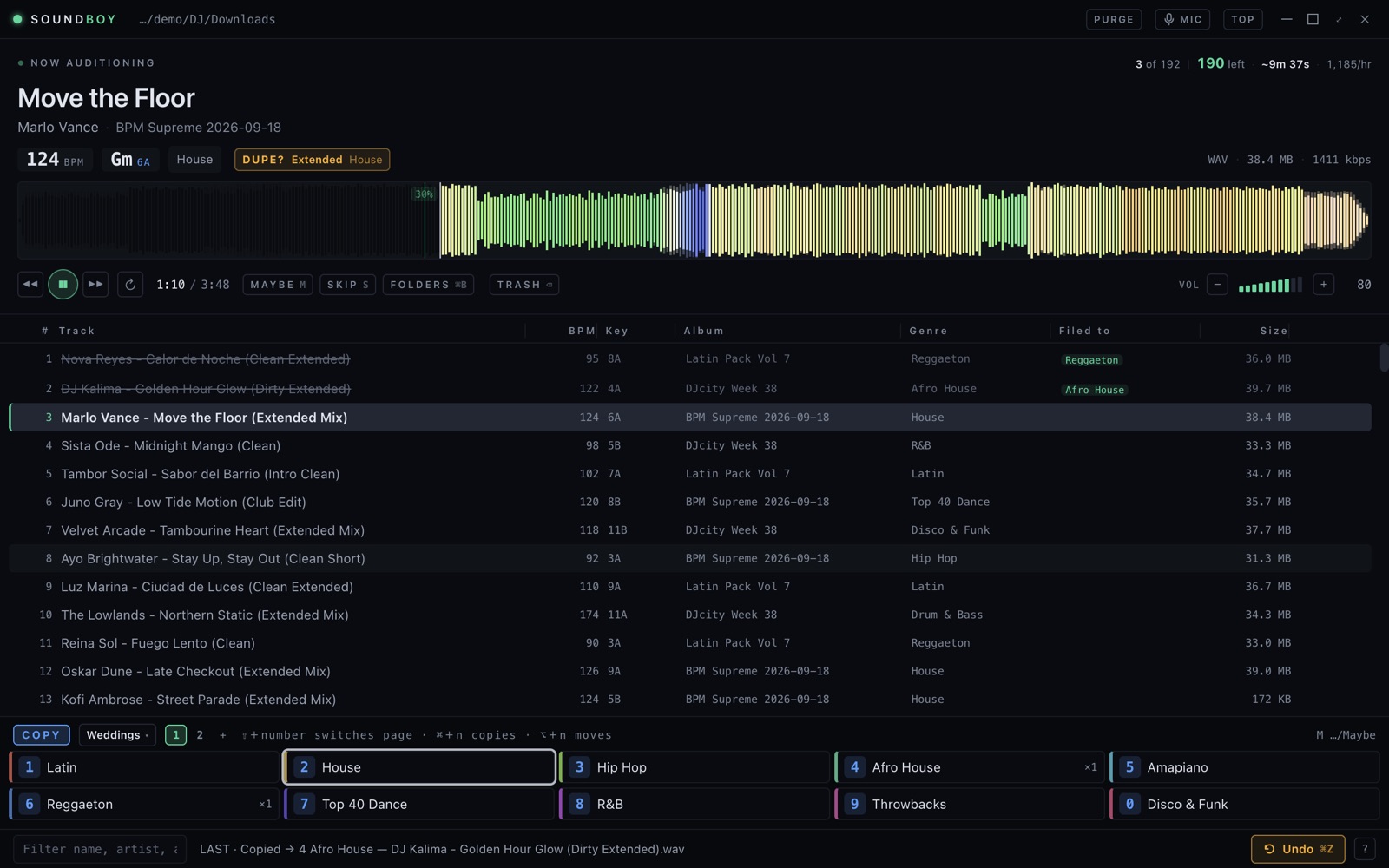
It knows what you already own

Pools resend tracks you bought last year, and four versions of the one you wanted. It catches both before they cost you an audition.

Checked before you start

When a crate lands, it says how many tracks you already have and which came in more than one version, before the first track plays.

MacWindows

DUPE? names the folder

A match shows which folder already has your copy. Click it to see that file. It's a warning only, and never stops you.

MacWindowsPhone pageiPhone appWatch

Clean and dirty aren't duplicates

It reads the version from the filename, and says nothing when two cuts really are different.

MacWindowsiPhone app

Exact copies, cleared at once

Tracks that are byte-for-byte copies of files you've already filed are offered as one sweep to the trash. There's nothing to listen to.

MacWindowsiPhone app

Skipped tracks come back

S skips without deciding. The count stays on screen, and ⇧S takes you back through them.

MacWindowsPhone pageiPhone app

Crate cleared

The last track ends on a summary: what was filed, skipped and trashed, and how many went into each folder.

MacWindows

Purge mode

For a folder that's already sorted but has grown too big. Nothing gets filed: each track is kept where it is, or purged.

Keep or purge

K keeps a track, purges it to the Soundboy Trash, and ⌘Z undoes either. ⇧P turns Purge mode on for the folder you're in.

MacWindowsPhone pageiPhone appWatch

Swipe it

On the phone, swipe the track right to keep it or left to purge it. The Keep and Purge buttons do the same.

iPhone app

It remembers what you kept

Kept tracks are remembered for each folder, so the next pass only plays ones you haven't decided on. Start over plays them all again.

MacWindowsiPhone app

Voice mode

Say where a track goes, from across the room. It listens for a short list of commands and ignores everything else, lyrics included.

Numbers, names and the basics

“Three.” “File Latin.” “Trash it.” “Maybe.” “Next.” “Undo.” “Back thirty.” And in Purge mode, “keep” and “purge”.

MaciPhone appWatch

Hears you over the music

A command only counts when it's short, said on its own, and the only command in what you said. A chorus with “trash” in it does nothing.

MaciPhone app

One track per command

A second command right after the first is held back, so “three… three” files one track, not the next one too. “Undo” always goes through.

MaciPhone app

What it heard, and why

The screen shows what it heard and what it did. A list keeps the last twenty-five, including near misses and why each did nothing.

MaciPhone app

Listens through your AirPods

Choose whether voice mode uses your AirPods or the phone's own mic, depending on whether full-quality music or being heard from across the room matters more.

iPhone app

From the wrist

Tap the mic on the watch and say one command. The same rules apply as everywhere else.

Watch

Your DJ software sees it too

Your files live in the folders. These features copy your sorting into the apps you play from.

Serato crates

A Soundboy crate with a sub-crate for each folder, written into Serato's own crate files. Crates you made yourself are left alone.

MacWindows

rekordbox

A collection XML with a playlist for each folder. Point rekordbox's Imported Library setting at it once.

MacWindows

Traktor

A playlist for each folder. Importing it again updates it in place and keeps your cue points.

MacWindows

M3U for everything else

An .m3u8 for each folder, which any DJ app can import.

MacWindows

The folder, in the file

Optionally writes the folder name into each MP3's Grouping tag. Audio and artwork are untouched, and undo takes the tag back out.

MacWindows

Remotes and hardware

The keyboard does everything. So can your phone, a Stream Deck, a MIDI pad or your watch.

Your phone, nothing to install

Turn it on in Settings and scan the code. Your phone's browser becomes the whole control surface, over your own Wi-Fi and not the internet.

Phone page

Three iPad layouts

Sorting, Browsing and Monitor, one button to switch. The ten keys are laid out like a Mac's number row.

Phone page

Every folder on the phone

Search all your folders and file into any of them. Hold one to put it on a number key.

Phone page

Away from home

Put Tailscale on the Mac and the phone, open the phone page at the Mac's Tailscale address, and it works from anywhere. The Mac just has to be awake.

Phone page

Stream Deck plugin

Keys show the playing track, the folder behind each slot and your pace. They always file into the same folder, whatever page you're on.

Mac

Works with the window in the background

F13–F21 file, trash, skip and undo from anywhere, for a macro pad or Keyboard Maestro. They aren't on a normal keyboard, so no other app loses a shortcut.

MacWindows

MIDI learn

Press a pad, pick what it does, done. A $60 Akai LPD8 becomes a filing console. The same pads work in every profile.

MacWindows

Always on top

A slim window that floats over Finder. Two looks: Deck, built to read at a glance at 1am, and Nineties.

MacWindows

iPhone, iPad and Apple Watch

An app with two modes: Remote drives the Mac, and Cloud sorts a Dropbox with no Mac at all. It's in private beta on TestFlight.

Remote mode

The Mac's whole remote in an app, with a strip on top showing whether it can reach the Mac and what's playing.

iPhone app

Cloud mode

Sorts your Dropbox right on the phone, with the Mac asleep or no Mac at all. Dropbox moves the files on its own servers, so nothing downloads to file it.

iPhone app

Pads copied from the Mac

Up to six pages of ten pads. Copy the Mac's pages in one tap instead of choosing sixty folders again.

iPhone app

A quicker folder picker

Search, with pinned and recent folders, and make a new folder right there. Tick several and they all become pads.

iPhone app

Crates on a shelf

The folders you sort often stay one tap away. Switch between them without leaving the deck.

iPhone app

Clashes ask

If a folder already has that track: keep both, replace it, skip it or decide later. Undo brings back a copy you replaced.

iPhone app

Sort from your watch

What's playing, play and pause, trash, undo, Keep and Purge in Purge mode, and every folder in one list. The Digital Crown sets the Mac's volume. In Cloud mode the watch controls the phone.

Watch

On the watch face

A complication shows how many tracks are left to sort.

Watch

Dropbox, without syncing it

Point Soundboy at your Dropbox instead of a folder. Your tracks never have to download to the computer.

Filing moves nothing

Dropbox moves the file on its own servers, so a 60 MB WAV files as fast as an MP3.

MacWindowsiPhone app

Only what you play downloads

A track downloads when you play it. Tags are read from the first part of the file only.

MacWindowsiPhone app

Your folders on the Mac stay put

Connecting Dropbox leaves your Mac's own setup alone. Switch back and everything is where you left it.

MacWindows

Your password stays with Dropbox

You sign in on Dropbox's own page, never in the app. The sign-in is kept in your keychain, and you can revoke it at dropbox.com any time.

MacWindowsiPhone app

Safe with your library

No account, no tracking

No sign-up, no analytics and no crash reporting. What you sorted stays on your computer.

A licence that works offline

Your key is checked on your own computer, so a venue with no Wi-Fi can't lock you out. It's never checked while you're filing.

Signed, notarised, updates itself

Opens with a double-click and no warnings. New versions download quietly and install when you quit.

Problem reports you can read

A plain text file you can read first and decide whether to send. Nothing is sent without you.

Where each one works

The desktop app does everything. The other columns show what you can do from each remote.

FeatureMacWindowsPhone pageiPhone appWatch
Audition: waveform, BPM, keyYesYesYesYesTitle and waveform
Ten keys, six pagesYesYesYesYesEvery folder, one list
Maybe, Trash, UndoYesYesYesYesYes
Profiles, folder shelfYesYesFoldersCrates shelfNo
Purge modeYesYesYesYes, with swipeKeep and Purge
Continuous playYesYesYesYesNo
Voice modeYesNoNoYesTap to speak
Duplicate warningsYesYesYesYesYes
Serato, rekordbox, Traktor, M3UYesYesDone on the MacNoNo
Dropbox without syncingYesYesDone on the MacYes, no Mac neededThrough the phone
Stream Deck, MIDI, F13–F21YesMIDI and F-keys